Posts

Fillable Document Newsletter for the month of June_2022
Image
Fillable Document - Jivrus Technologies Fillable Document Newsletter for the month of June 2022 Fillable Document updates GUI improvements:   Select the email template(s) that is to be sent on published form submissions. Providing custom placeholders for text, paragraph, autocomplete, and dropdown fields. Form Viewer improvements - now users can visualize the listing (one level of listing), and slide layout (Themes). Introducing a slider to adjust the height and width of the field. You can see what is happening with Fillable Document by following the What’s new page. The User of the Month - June 2022 Congratulations Janine Sarna-Jones for being selected as the user of the month of June for Fillable Document. Janine Sarna-Jones has been a user of Fillable Document since October 2021. She is using Fillable Document to generate agreements. This is what she feels about Fillable Document “ This add-on is just what I want. I have been looking for! It does exactly what I've been needin...

Cherishing the sixth anniversary of Jivrus Technologies !!!

Image
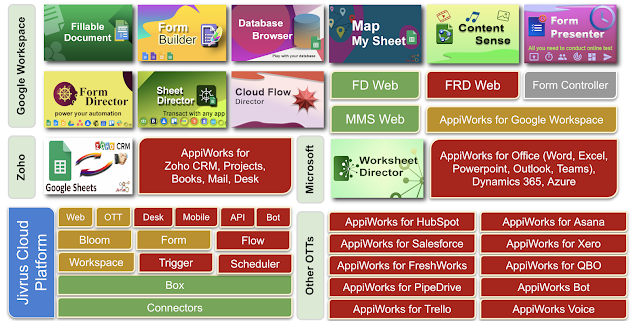
It's sixth anniversary of Jivrus Technologies It has been six years plus few months of doing what we call it as " intelligent integration and hyper-automation " for our customers on the cloud. We work hard to make our customers successful with our products in their business, and be excited to hear their positive feedback. Our tech, product, platform stack has grown with more blocks turning from red to amber to green (green is live).  The path has been enjoyable journey of challenges on launch, marketing, refinement of products , to inspire, value-add, growth to customers , by attracting and engaging with employees . Covid has helped us evolve into remotely working company and we will continue to 'work from anywhere' with certain possibilities of hybrid working in the future. We are continuously innovating to bring value to customers with deep level of research & development in areas of integration and automation. Keeping our eyes and ears open, mind sharp, an...

Fillable Document Newsletter for the month of May_2022

Image
  Fillable Document - Jivrus Technologies Fillable Document Newsletter for the month of May 2022 Fillable Document updates GUI improvements & Templates:   Navigation improvements The collaborator mode and sidebar will not expire anymore(No timeout in using Fillable Document in sidebar & collaborator mode) Form Response manager will now have the ability to reorder & resize the columns. Underscores(_) can be used in field names. Google Login is enabled every time in the collaborator mode. You can see what is happening with Fillable Document by following the What’s new page. The User of the Month - April 2022 Congratulations Mr/ Mrs. Victoria Stratman for being selected as the user of the month of April for Fillable Document. Victoria has been a user of Fillable Document since September 2020. She is using Fillable Document to generate proposals, contracts, etc. This is what she feels about Fillable Document “ It's a great tool, easy to use, and capable of multiple ta...

Fillable Document Newsletter for the month of April_2022

Image
Fillable Document - Jivrus Technologies Fillable Document Newsletter for the month of April 2022 Fillable Document updates GUI improvements & Templates:  Major GUI improvements were made in the month of March. This includes the simplification of the already existing GUI to make it more effective and simple. We did this to enhance the user experience. More templates were added to the template gallery in the Fillable Store. Also, the old template gallery is now merged with Fillable Store templates. Updates were made in Email Templates. Now you can add Bcc & ‘Reply To’ to your email. Also, you can insert tables with all the form field contents into your email message. Introduced 2 new pricing plans Business & Enterprise with higher quota to meet our customer demand. You can see what is happening with Fillable Document by following the What’s new page.

It is 5 years of Jivrus Technologies

Image
Five years !!! Looking back on the five years that we just crossed, we are happy to have built a self-sustaining SaaS cloud products company.  With that, the company just starts to leap further into our vision of "awesome software products worldwide". It is time to make deep investments in Jirvus' own cloud platform and ecosystem to power enterprise-grade products. Market research and listening keenly from our product users have positioned us in a better place to think 'continuously lean' practices in the product life cycle. Our technology partnership with Google, Microsoft and Zoho, integration partnerships and sales partnership circle have been the strong supporting factors of our strength. Working our way through covid-19 , our team has learnt to adapt and trying to do the best possible things  in the situation. Thank you, customers, partners, advisers, and staff for making the journey continue with changing gears. Thank You, Lord, for Your  blessings and  ...

Publish Document - Fillable Document

Image
  Publishing a Form Publish Form is a feature where users can create a fillable document and publish it to end-users for submitting and generating documents. There are two modes by which users can publish a Form: Publish as Logged in user. publish as an Anonymous user. How to Publish a form? Open Fillable Document add-on from your Google Document. Click on Publish Form button.                                   On clicking the publish form button it will redirect it to the publish document details. Click on Publish Settings  Switch on Always ask Google Login if the form needs to be published as a logged in user so that it will ask for login while submitting the form. Switch off Always ask Google Login if the form needs to be published as anonymous user so that it will not ask for login while submitting the form.  Read more details about this from Fillable Document website   Contact ...

Synchronize services

Image
  Synchronize Service Synchronize service refers to keeping data across multiple systems consistently. In Sheet Director Synchronize service refers to keeping data consistent between Google Sheets and other applications. Currently synchronize service is employed in Google Calendar App & Google Contacts in Sheet Director. How Synchronize services work? Select the service as Synchronize. This will Synchronize Events between Google Calendar. Synchronize Settings Synchronization Keys: The keys will be used for matching rows in Google Sheet with data in Google Calendar. Conflict Resolution: When Synchronization happens, there could be a conflict of data between Google Sheets and App [App] Wins - where App is the currently selected App (e.g. Google Calendar) Sheet Wins App Wins: Latest data from Google Calendar will be updated into Google Sheet. Sheet Wins: Latest data from Google Sheet will be updated into Google Calendar. Note: The major requirement in synchronization is the sync...